
SMALL SCALE, REAL DEADLINES
Tired of complex spreadsheets or busted notebooks? Seedtime makes your life easier.
A lot of crop planning software is either too complex or just not easy to use. And let's be honest - a lot of small scale farmers end up trying to track the season in a spreadsheet. But a spreadsheet doesn't know your frost dates or how long a variety takes to mature.
A market garden is a hundred plantings with three or four dates each. Move one seeding date in a spreadsheet and you retype the four that hang off it (or code complex rules). By March it's a mess.
Skip a succession sowing in June and the hole shows up at the stand in August, right in front of the customer who came for your beans. Yikes.
Whoever is out at six in the morning needs to know what to seed, where, and how much, without waiting on you. A plan only you can read stops dead the day you're somewhere else.
HOW MARKET FARMERS USE SEEDTIME
Five steps from an empty field to a working week
Enter where you grow and Seedtime pulls your average last and first frost dates and your season length, automatically in the USA or with AI anywhere in the world. Every date in the plan is worked back from those two numbers, not from a seed packet’s national average.
Draw your beds at their real dimensions on a snap-to grid canvas. Set spacing in inches (or cm) between plants and between rows, and Seedtime works out how many plants each bed holds before you order seed when you fill the beds with those crops.
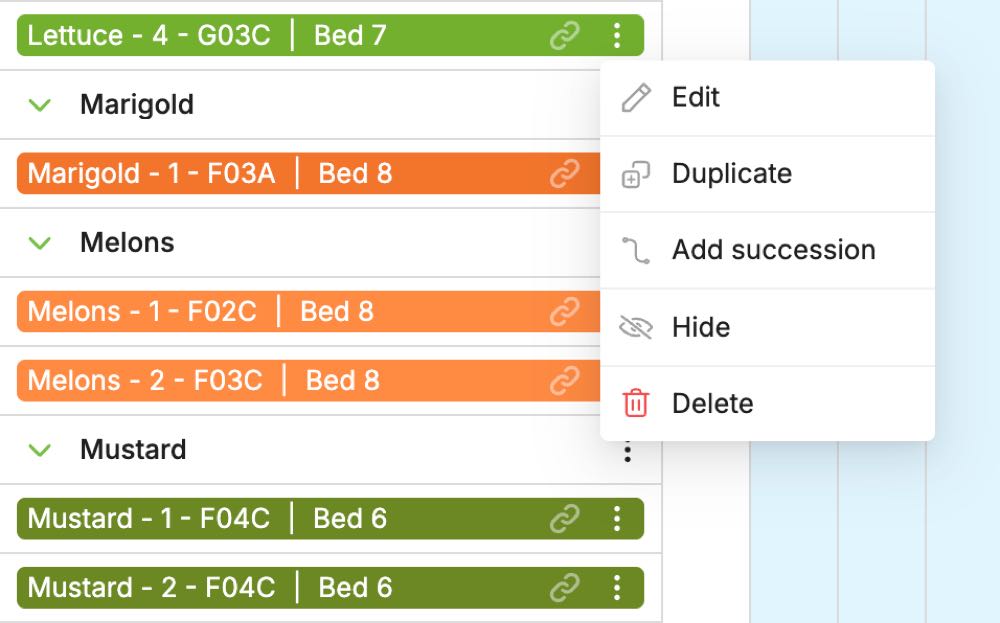
Open a planting’s menu, pick "Add succession", and the next round drops in a couple of weeks later carrying its own seeding, transplant and harvest dates. Read the whole thing on one timeline: crops down the left, the year across the top, a bar for every planting.
Every planting turns itself into dated tasks tagged with the crop and the bed - Broccoli - 1 · Bed 3. Work them off a phone in the field, or print the week and hand it out. Anything that slips collects in Overdue with the date it was due.
Log each harvest from the harvest task already sitting on the list. Seedtime totals the pounds and what they were worth, so next year’s plan starts from real numbers instead of memory. Harvest tracking comes with the Unlimited plan and is in early development.
SUCCESSIONS
The second sowing is two clicks from the first
Sowing the same crop again in two weeks shouldn't mean setting it up from scratch. Open a planting’s menu and pick Add succession. The next round drops in a couple of weeks later with its own seeding, transplant and harvest dates. Stack as many as the season has room for and they line up on the calendar together, each tagged with the bed it's going into.
Then sort the list however you're thinking that morning:
Unlimited planting schedules are on every plan, free included. Paid plans add unlimited custom crops, custom varieties and custom task series to tailor the entire flow to your own custom task flow for each crop.
NO GAP AT THE STAND
Five sowings of one crop. Eleven weeks of picking with no gap in the middle.
This is the math every market grower does in their head and probably gets wrong once a season. Seedtime does it from your frost dates and the variety’s days to maturity, then you add the successions so you can see the overlap before you order the seed.
[[ waveNote ]]
IN THEIR OWN WORDS
Growers who sell what they pick
“I manage over 10 acres of produce farm for a professional market garden. The Seedtime platform helps me keep all of our crops organized, on schedule and profitable. I can simply print out the ‘task list’ and hand it to employees and they know exactly what needs done for the day.”
“We are small market farmers and most of our stress is second guessing when to seed, transplant, and predicting harvest windows. Seedtime is a game changer. Our favorite feature is the task list!”
“I grow veggies for a community supported agriculture program on a 1 acre field and each year I dread crop planning. Seedtime has made it super easy to select crops, map out their location on the farm, and then produce a task list of when and where to seed or plant your crops.”
“With color coding and multiple calendar views, this made planning my market garden and succession planning very easy. I can label things by bed number and search each bed to see where my holes for opportunity may be.”
WHAT IT COSTS
Start free. Unlimited is the one a farm ends up on.
“This has been a game changer for our small farm. The help with planning, tasks, and keeping track of all the things with the harvest has showed us our profitability and enabled us to scale in future years.”
Andrea Taylor Ballard · Dec 2024 · TrustpilotFree forever, no trial clock: 1 calendar with unlimited planting schedules, 1 layout with up to 8 rectangular beds, unlimited tasks and journal entries. Enough to plan a few beds and see whether the dates hold up before you pay anything.
Compare all three plansGOOD TO KNOW
Market farming questions, answered
It's built for whatever you grow. Growers run it on a handful of raised beds and on ten acres of produce, and the math is the same either way - your frost dates, your bed dimensions, the days to maturity on the variety you actually planted. What it covers is the growing side - the calendar, the layout, the task list, the harvest log - rather than the sales side of the business. We have had some larger users bump into issues with layouts that scaled too big. If that happens let us know and we're here to help in any way we can!
Yes. Add succession sits in every planting’s menu and drops in the next round a couple of weeks later, carrying its own seeding, transplant and harvest dates. Duplicate, Edit, Hide and Delete are in the same menu. Stack as many as the season has room for and they line up on the calendar together.
The week’s tasks print, which is how most crews use them - pin the sheet in the pack shed or hand it out in the morning. The same list is in the Seedtime mobile app and in any browser, tagged with the crop and the bed, so whoever is out there knows what to do and exactly where.
Yes, on the Unlimited plan. Every planting already carries a dated harvest task: open it, enter what you picked, and it's logged against that crop and that day. Seedtime adds up the pounds and what they were worth as the season runs, so come fall you can see which crops did the best.
Containers, rail boxes and GreenStalk tiers, planned so every pot is carrying something.
See how Backyard gardenersRaised beds and kitchen gardens planned around your real schedule, not a seed packet’s best guess.
See how HomesteadersFood-scale planning: succession waves, preservation crops and harvest tracking for the pantry.
See howPlan next season before the seed orders go in
Create your free account, draw the beds you already have, and put the whole year on one timeline - every sowing, every harvest window, every task, dated from your own frost dates.
Plan My Market Garden FreeFree forever · No credit card required
Seedtime is the free online garden planner for real gardens - a personalized planting calendar, a garden layout planner with square foot gardening built in, and AI planning tools for vegetable gardens, flower gardens, raised beds, and vertical planters.