
The garden to-do list that writes itself
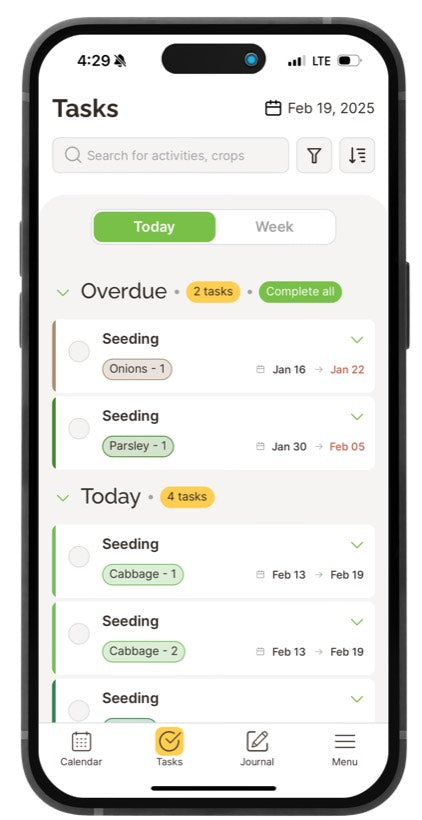
Every planting in your calendar turns itself into dated tasks - seed inside, transplant, harvest - grouped into what's overdue and what's due today. Open Seedtime, work the list, close it. Nothing to set up, nothing to remember.

WHERE TASKS COME FROM
You never write a single task
Add a crop to your calendar and that's the last decision you make about it. Seedtime counts back from your own frost dates and schedules the entire task list for that crop. Every date is planned for you so you don't have to do the math or work off of guesswork.
WORK THE LIST
Overdue and today. Nothing else.
A season has thousands of dates in it. The list shows you the handful that matter this morning - what slipped, and what's due now. Everything else can wait its turn. Go ahead and give it a try - check one off:
"Our favorite feature is the task list! It has saved our marriage (it's no ME honey, Seedtime says we have to do this!) and given us the valuable benefits of more free time and less stress."
Melissa Mattern · TrustpilotOUT IN THE GARDEN
Take the list outside with you
Truth is, a task list is only useful where the work actually happens. So we made it to go there. Check tasks off from your phone while you're out in the garden, or print the week and pin it up in the shed.
GET STARTED
Three steps, about three minutes
GOOD TO KNOW
Task list questions, answered
No. Tasks come from your planting calendar - add a crop and its seeding, transplanting and harvest tasks appear on the right dates on their own. On a paid plan you can add your own custom tasks or custom task series to use when scheduling crops as well.
Nothing is lost. Anything past its due date collects in the Overdue group with the date it was due, so you can catch up in order - or clear the whole group in one go with "Complete all".
Because a planting is a window, not a deadline. The start date is the beginning of the job window and the due date is the last day to get it done as scheduled. This gives you space so you can see how much room you have this week to get tasks done for your crops.
Yes - unlimited tasks on every plan, including the free one, alongside your calendar, your layout and your journal. Basic and Unlimited add custom tasks and repeating task series.
Stop keeping the whole season in your head
Create your free account, add what you're growing, and let Seedtime tell you what to do this week.
Get My Task List Free Free forever · No credit card required
Seedtime is the free online garden planner for real gardens - a personalized planting calendar, a garden layout planner with square foot gardening built in, and AI planning tools for vegetable gardens, flower gardens, raised beds, and vertical planters.