Skip to content
Features / Layout planner Free · up to 8 beds

A garden layout that knows how many plants fit

Draw your raised beds, containers, in-ground beds and GreenStalk tiers to scale, then drop in crops from 9,705+ built-in varieties. Seedtime fills in the spacing, works out how many plants the space holds, and keeps every date in step with your planting calendar.

Square foot or custom inches Beds, pots, rows & GreenStalks
A whole garden in the Seedtime layout planner: eight raised beds in two rows either side of a shed, each bed planted out with lettered crop markers at their real spacing - beans, kale, peppers, tomatoes, onions down the bed edges and blocks of salad rows - with four round planters at the corners and fruit-tree canopies drawn to scale around the edges of the plot, all on a measured grid
Your whole garden on one canvas - beds, planters, trees and structures to scale, planted to the plant.

DRAWN TO SCALE

Beds, containers, rows and vertical planters

Give each planting location its real dimensions and put it where it actually sits - against the house, along the fence, or out on the patio. The plan on your screen matches the garden you walk out into. So the space you're planning is the space you actually have.

Raised beds, in-ground beds, containers and GreenStalk-style vertical planters in one layout
Sized in feet and inches (or metric) on a snap-to grid, with a scale bar for the whole garden
The free plan covers a full garden layout with up to 8 rectangular beds
[[ locName ]] Planting location
4 ft 0 in
8 ft 0 in
1 square = 1 ft 32 sq ft
2 ft 0 in
2 ft 0 in across
Round container 3.1 sq ft
2 ft 6 in
20 ft 0 in
Open ground 50 sq ft
5 tiers
1 ft 7 in across
6 pockets per tier 30 pockets

BEDS THAT ARE NOT RECTANGLES

Draw the bed you actually built

Gardens rarely come in neat rectangles. Customize any corner and the bed takes the shape it actually has in the ground - around the corner of the house, along a curved path, into the awkward end of the yard. Every edge is measured as you drag, so the area stays true and the planting fills the shape you end up with.

Customize your bed into an L, a wedge or a long dog-leg - whatever shape the bed really is
Every edge is labelled in feet and inches while you work, so it measures up to the one you built
Spacing and plant counts will fill the new outline when you add them into your custom shapes
An L-shaped raised bed being edited on a measured grid: a green outline with round handles at each corner, one of them selected, and every edge labelled with its length - 8 ft across the top, 4 ft down the left, a 4 ft 6 in step in, and 7 ft 6 in down the right side
An L-shaped bed around a corner - 8 ft across the top, 7 ft 6 in down the side, every edge will stay measured as you pull a handles.

SPACING THAT MATCHES YOUR METHOD

Square foot, custom inches, or pocket by pocket

Spacing is set per bed and per crop, so one garden can hold an intensive square foot bed, a row garden on 18 inch centers and a vertical planter at the same time. Seedtime does the math either way - how many plants fit in your beds, and how they sit in the space.
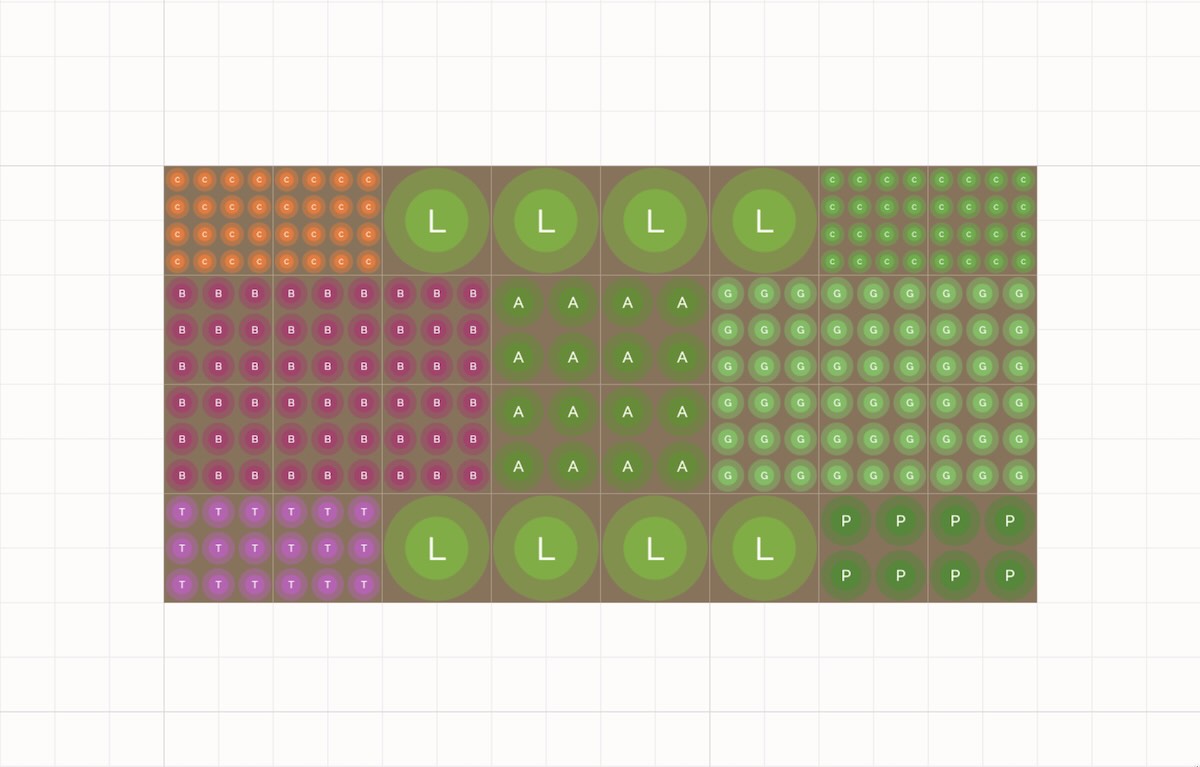
Square foot gardening built in - every square filled with the correct plant count, automatically (or set it manually)
Regular or custom spacing - set the inches (or cm) between plants and between rows for any crop
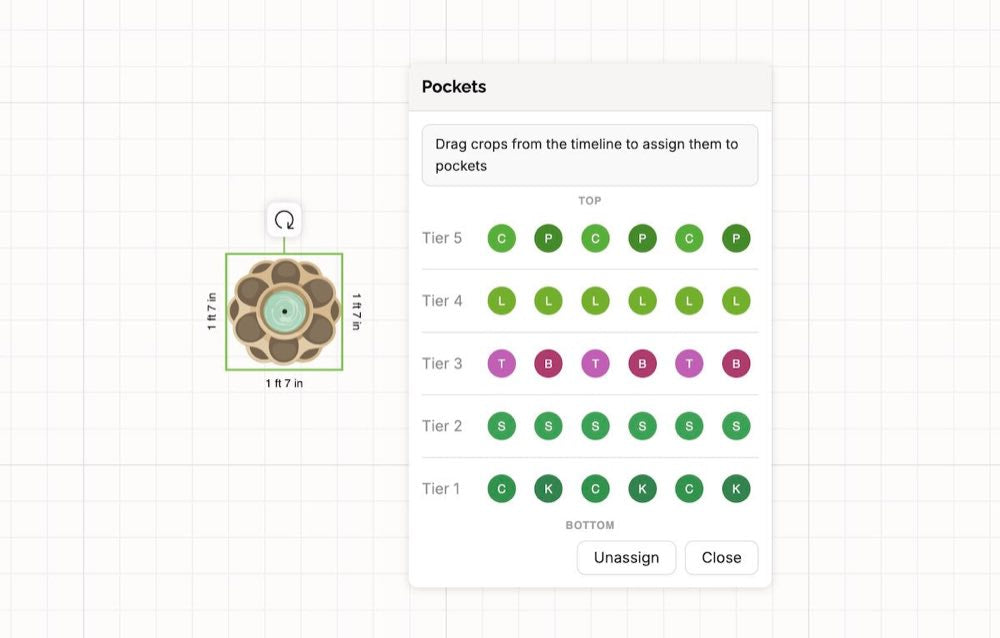
GreenStalk and vertical planters - crops assigned pocket by pocket across every tier
A raised bed on a one-foot grid in square foot mode: each square is packed with the right number of plant markers for its crop, from a single lettuce to sixteen carrots
Square foot mode - every square holds the correct plant count for its crop, counted for you.
The same raised bed with custom spacing: rows of closely spaced plant markers for small crops and widely spaced markers for large ones, each set by the inches between plants
Custom spacing - set the inches between plants and rows, and the bed fills with exactly what fits.
A GreenStalk vertical planter selected in the layout with its Pockets panel open, showing tiers one to five and a crop assigned to each of the six pockets per tier
GreenStalk mode - assign a crop to every pocket, tier by tier, and plan what follows it.

WHAT GROWS WELL TOGETHER

Companion advice written for your zone

Select a planting and Seedtime tells you what belongs beside it and what to keep out of the bed - with the spacing to use and the reason it works. The advice is tailored for your growing zone so crop suggestions fit what grows well in your area.

The crops that work well with the one you selected, and the ones to avoid
Exact spacing in inches and centimeters, with the reason - like root depth, shade, or pest pressure
Tuned to your growing zone, and free on every plan
A bed of lettuce, tomatoes and carrots selected in the layout with the Companion Planting panel open beside it, listing plants that work well with lettuce: asparagus 6-12 inches away for afternoon shade in zone 7b summers, and beets and carrots 4-6 inches away because their roots sit at a different depth
Lettuce selected in a bed with suggested companion crops or plants to avoid.

ONE PLAN, NOT TWO

The layout and the calendar are the same plan

Every planting you place in a bed carries its own dates. Move it, and the seeding, transplant and harvest dates move with it - in the calendar, in the layout, and in this week's task list. Nothing to keep in sync by hand.
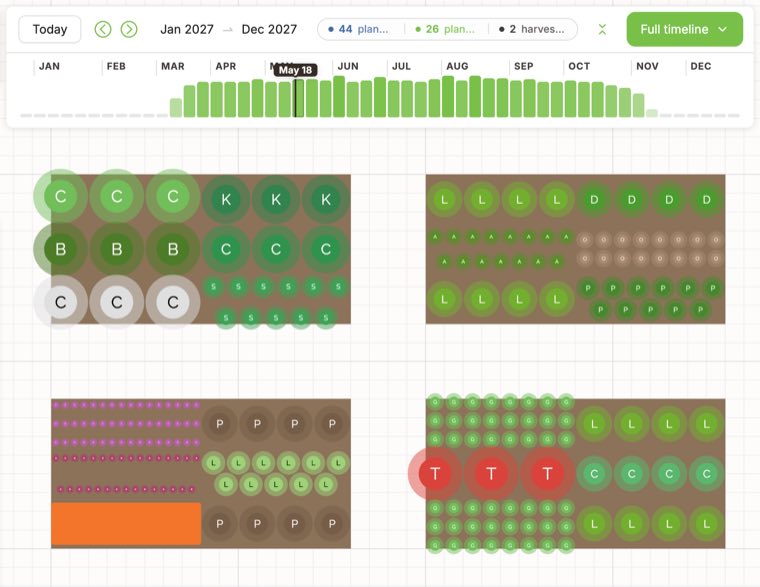
Drag any planting and every related date shifts with it
Spacing and days to maturity come pre-filled from 9,705+ built-in varieties
Companion planting suggestions per crop - now free on every plan
The Seedtime layout planner with the season timeline open above it: the year runs Jan 2027 to Dec 2027 with a bar for each week’s plantings and the scrubber parked on May 18, and the four raised beds below are drawn as they stand on that date, each crop a lettered marker at its own spacing
The same plan on May 18 - drag the timeline and every bed redraws for the date you land on.

GET STARTED

Three steps, first bed in minutes

1
Create your free account Seedtime pulls your frost dates and growing season from your zip code.
2
Draw your beds Set real dimensions for beds, containers, rows or a vertical planters, then place them where they sit.
3
Drop in your crops Choose spacing per crop, and every plant count and date lands in your calendar and task list.

GOOD TO KNOW

Layout planner questions, answered

Yes. A free Seedtime account includes one visual garden layout with up to 8 rectangular beds, and it stays free - no trial, no credit card. Unlimited adds unlimited layouts.

Yes, and you set it per bed and per crop. Every square is filled with the correct plant count for that crop automatically, so a square of carrots and a square of lettuce each hold what they should.

Yes. Containers, in-ground beds and GreenStalk-style vertical planters all live in the same layout, and vertical planters are planned pocket by pocket across every tier.

No. All 9,705+ built-in varieties arrive with spacing and days to maturity filled in. Change any of it if you grow differently and the plant count updates with you.

Ready to map your garden?

Create your free account, draw your first bed, and see exactly how many plants fit in it.

Start Your Free Layout Free forever · No credit card required