Skip to content
Features / Garden Blocks NEW Free · uses AI credits

Done-for-you garden plans, one block at a time

Ever wished somebody would just hand you the plan? A Garden Block fills a section of your bed with a whole sequence of crops - spring, summer and fall - timed to your local frost dates for a continual harvest. Pick a plan, drop it in, and Seedtime works out every date for you.

The same four garden beds shown two ways behind a slider: one side has each bed divided into blocks labelled with its Garden Block plan name, the other has those same beds planted out crop by crop as individual plant circles CROPS
BLOCKS
Click or drag anywhere in the image to slide between your block plan and the crops growing in it - the same four beds, either way.

START WITH THE SPACE YOU HAVE

Divide your beds into blocks - or use a whole bed as one

A block is simply a stretch of bed you want producing all year. Split a raised bed into three blocks, give a container one block, or plan your entire in-ground bed as one block. Seedtime even suggests how many crop sequences will fit in the width of each growing space you want to add a plan to.

Nothing to rebuild - blocks map into the beds you already have
Works in raised beds, in-ground rows, and containers
Free accounts get up to 8 beds in the layout planner
However your garden is already built
1Whole bed as one block
2Split into two
3Split into three
A block is just a space you want kept full. Raised beds, in-ground beds, containers - a 100 ft market bed can be one block or ten.

PICK A PLAN, NOT A PUZZLE

Add plans to each block to carry it through the whole season

Each plan is a finished crop sequence - a spring planting, a fall planting, and the right crops filling the gap between them. Drop one in and that block is spoken for from first seeding to last harvest. We grew over $2,000+ in a small 15 x 20 ft test garden (that's four times the average yield!) and that experience inspired these done-for-you plans.

12+ done-for-you plans, and every one is free to use
Swap any crop for a curated alternative that fits the same window, then save it as your own
Rebuilt for your climate - a Florida plan looks nothing like a Minnesota one
Inspired from $2,000+ grown in one 15 x 20 ft garden4x the average yield per square foot
Nightshade Family Garden
SpringSummerWinter
Green OnionsZinniaGreen Onions
RadishesTomatoes - IndeterminateRadishes
Green OnionsZinniaGreen Onions
Legend:Frost riskSummer heat

MAKE IT YOUR OWN

Swap any crop, keep the sequence

A plan is a starting point, not a hard rule. Swap out a crop you would rather not grow and Seedtime offers alternatives that fit the same crop growing window - so every handoff either side of it still works. Save the result and it becomes your own personalized plan.

Curated alternatives for the slot, or browser all the available options
Change one crop or the whole sequence - the dates calculate based on what you choose
Save your version as your own plan and reuse it year after year
Nightshade Family GardenBlock B
SUMMER SLOT
RadishesTomatoes - IndeterminateRadishes
SuggestedAll
Original
Tomatoes - IndeterminateTall
Common crops
AmaranthTall
ChayoteTall
CornTall
CucumberTall
Dry BeansMedium
EggplantMedium
Fava/Broad BeansMedium
Garbanzo Beans/ChickpeasMedium
Ginger (baby)Tall
Green Beans - PoleTall
Only crops with the same growing window are offered, so the spring and fall plantings either side of this one still work.
Save as my plan

SEE IT BEFORE YOU PLANT IT

Watch the season change in your bed

The part that trips everyone up is the handoff. Pulling one crop at the right moment with the next already started and ready to go in is like trying to tap a different rhythm with each finger on your hand - all at the same time. Your blocks handle every handoff so you don't need to think about it. Slide through the season and watch it happen:
Reminders to start the next crop indoors before the last one is harvested
Scrub any week of the year in your layout - fix October's gaps back in April
Miss a planting and the sequence still carries the block
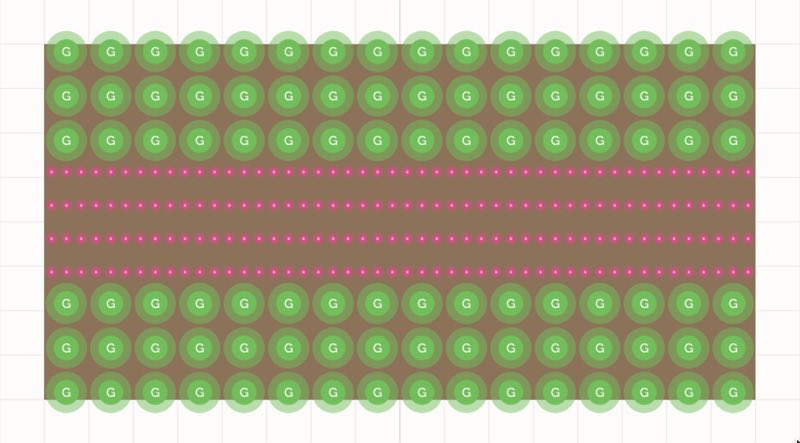
A Seedtime bed planted for the cool season: three rows of green onions, four dense rows of radishes through the middle, then three more rows of green onions
April - green onions and radishes make the most of the cool weeks while the tomatoes are still seedlings indoors.
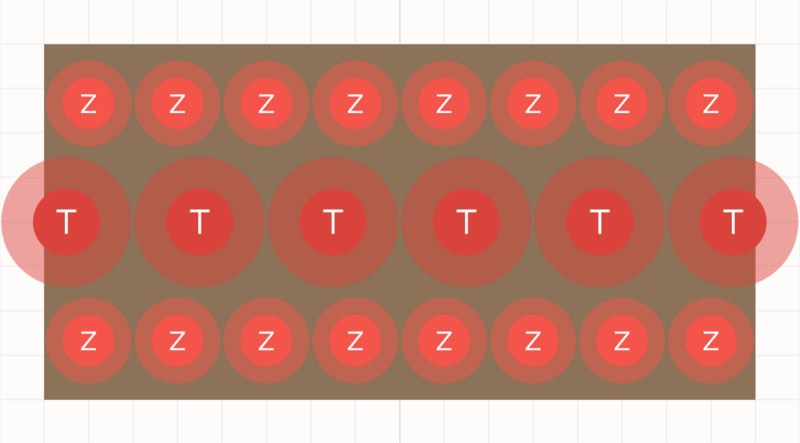
The same bed in summer: a row of zinnias, a single row of widely spaced tomatoes down the centre, and another row of zinnias
July - the radishes came out on schedule and the tomatoes went straight in, with zinnias alongside for the pollinators.
A Seedtime bed planted for the cool season: three rows of green onions, four dense rows of radishes through the middle, then three more rows of green onions
October - a second round of cool-season crops carries the block right up to your first hard frost.

NOTHING TO TRANSFER

It lands in your calendar and layout - not on a wishlist

Add a plan and every date is already calculated from your own frost dates, then written straight into your calendar, your layout and your weekly task list. No spreadsheet, no seed-packet math, no plan gathering dust in a browser tab.

Every seeding, transplanting and harvest date set for your exact location
A weekly task list that tells you what to do and how to do it - all season long
Use the mobile app on your phone to check tasks off in the garden or snap photos for your journal - and more
Your season, block by block2026
MARAPRMAYJUNJULAUGSEPOCTNOV
Block ARadishesTomatoesSpinachBlock BPeasPole beansBroccoliBlock CLettuceBasilKale
Each bar hands off to the next. Seedtime tells you when to start the following crop indoors, so it goes in the day the last one comes out - no (or less) empty weeks, no guessing.

GET STARTED

Three steps, about three minutes

You don't need a finished garden plan to start - one bed and one block is enough.

1
Create your free account Enter your zip code - Seedtime pulls your frost dates and growing season for you.
2
Draw your beds Free accounts get up to 8 beds, and any bed can be one block or several.
3
Add your first plan Pick one, drop it in, and your whole season is scheduled. Shazam!

GOOD TO KNOW

Garden Blocks questions, answered

Dropping a plan into a block spends AI credits - the same credits that find your next best seeding date for any crop. Free accounts get 10 every month; paid plans include far more.

Yes. Plans are generated from your own frost dates, season length and summer temperatures, so a year-round hot climate gets a completely different sequence than a short northern season.

Yes - run one sequence per container and the block keeps it planted all season.

Unlimited gives you unlimited block installs, unlimited calendars and layouts, unlimited custom crops, custom varieties, and task series, unlimited access to weather data, inventory tracking, and records & analytics - plus up to 20% off everything in the Seedtime store.

Ready to grow a continual harvest?

Create your free account, divide a bed into blocks, and drop in your first done-for-you plan today.

Try Garden Blocks Free Free forever · No credit card required