Skip to content
Your Garden Just Got Cheaper – Click Here to Get up to 20% OFF EVERYTHING. Already a Member? Sign in Here.
Features / Calendar Free forever

A planting calendar that does the math for you

Tell Seedtime where you grow and every crop is mapped against your local frost dates - when to start seeds indoors, when to transplant out, when to harvest. Change your mind? Drag the planting and every date tied to it moves right along with it.

9,705+ built-in varieties 571,305+ gardeners 1 calendar free, forever
A Seedtime planting calendar running July to November: weekly columns with the forecast above them, the current week picked out in yellow and the cooling weeks shaded blue, and a row per planting - a seed or transplant marker where the work starts and a harvest bar running to the end of the window, for arugula, beets, two successions of broccoli and cauliflower
Every crop's seeding, transplant and harvest windows across your whole season - on one screen.

YOUR GROWING LOCATION

Frost dates set to your growing location

Seedtime pulls your average last and first frost dates and your season length (automatically in the USA or with AI anywhere in the world), then works every planting date back from them. The same crop gets completely different schedules in different climates because everything is based on your local growing area.
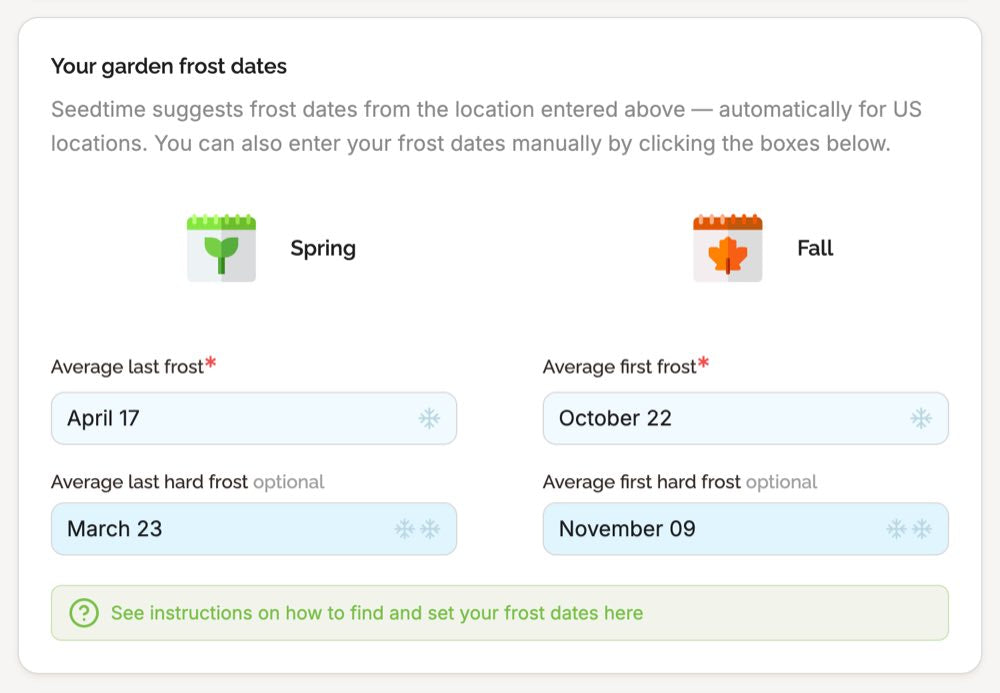
Your average last and first frost dates pulled from your location, not looked up on a zone chart
Live in a micro climate? Manually adjust anything
9,705+ built-in varieties, each with its own days to maturity and growing info
The Seedtime frost date settings: a Spring column with Average last frost April 17 and an optional Average last hard frost of March 23, a Fall column with Average first frost October 22 and an optional Average first hard frost of November 09, each in an editable box
Suggested from the location you enter, and editable whenever you know better.

SEEDING TIMES

Done-for-you seeding times - or choose your own

No more guesswork. Every crop you add arrives with its seeding, transplant and harvest dates already worked out from your frost dates and its own days to maturity. Not the week you had in mind? Drag the planting and every date attached to it - indoor seeding, transplant, harvest - recalculates on the spot.

Suggested seeding, transplant and harvest dates on every crop you add
Choose your own dates instead or move a planting and every related date follows automatically
Unlimited planting schedules on your calendar, even on the free plan
A crop's task series in Seedtime: Seed Inside marked as the anchor task, starting 56 days before first frost with a 7 day duration, then Bed Prep 7 days before Transplant, Transplant 21 days after Seed Inside, a Tend task repeating every 21 days until harvest, and a 14 day Harvest window at 52 days to maturity, with Add Perennial Harvest and Add Custom Task buttons
Every crop arrives timed like this. Edit any step, or add one of your own.

SUCCESSIONS

Add succession plantings with just a couple clicks

Here's the deal. Sowing the same crop again two weeks later should not mean setting it all up from scratch. Open a planting's menu, pick "Add succession", and it drops in another planting a couple weeks later so the bed keeps producing instead of finishing all at once.
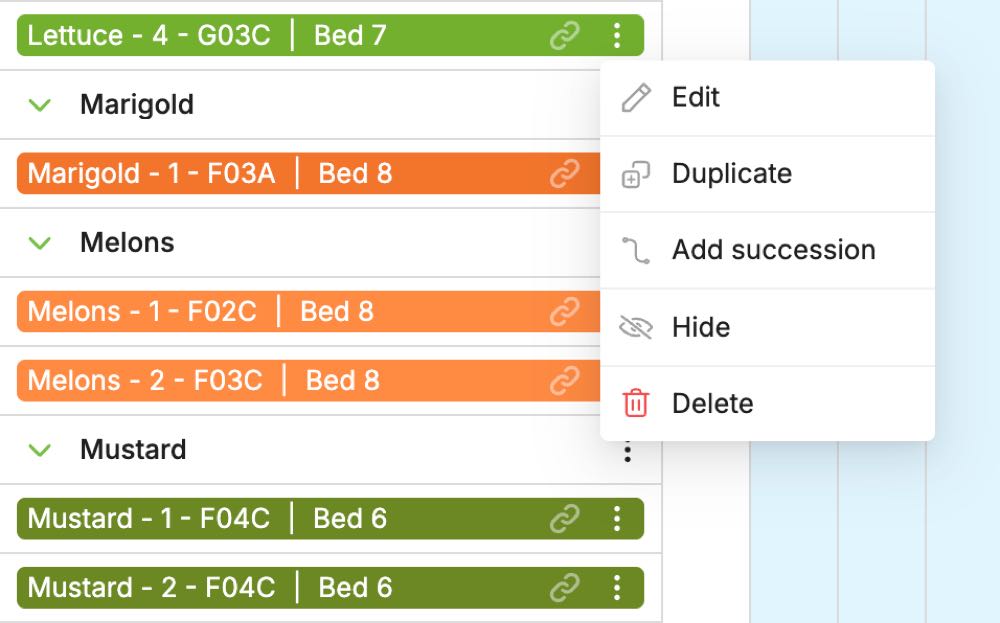
Add succession sits in every planting's menu, so it's just a couple clicks away
Each succession carries its own seeding, transplant and harvest dates
Stack as many as the season has room for and they line up in the calendar together
Duplicate, edit, hide or delete a planting from the same menu
A planting's menu open on the Seedtime calendar, showing Edit, Duplicate, Add succession, Hide and Delete, beside rows for Melons - 1 and Melons - 2 and for Mustard - 1 and Mustard - 2 in the same beds
Two clicks from one planting to the next round in the same bed.

TIMELINE VIEW

See your whole plan on one simple timeline

Every crop, every planting and every window, laid out across the months on a single screen. Nothing to page through week by week - the season reads left to right, so you can see what overlaps, where the gaps are, and which weeks are going to be busy.
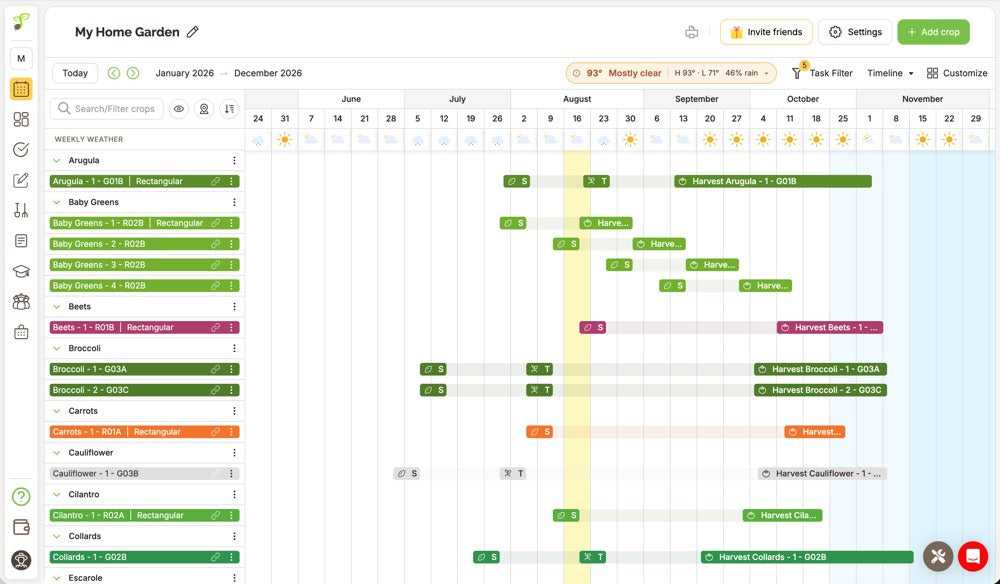
Your whole year on one timeline, every seeding, transplant and harvest window in place
Crops down the left, months across the top, a row for every planting
Each bar shows how long that planting is growing from seeding through harvest
Set the range to whatever you want to look at, one month or the full year
The Seedtime calendar in timeline view: crops listed down the left beside a Search and Filter crops field, with every planting drawn across January to December as seeding, transplant and harvest bars
Crops down the left, the whole season across the top.

SORT AND FILTER

Sort and filter the calendar to find anything

A full season is a lot of rows. Search or filter down to the crops you're working on, then put the list in whatever order you're thinking in - by crop, by where it's planted, or by the date that matters this week.

Sort by crop, by group, by planting location or by Block plan
Or sort by seeding date, in-ground date or harvesting date
Search and filter your crops to focus on just the ones you care about
Hide what you're not working on and bring it back whenever you want
The Sort order menu open on the Seedtime calendar, listing By Crop, By Group, By Planting Location, Seeding Date, In Ground Date, Harvesting Date and By Plan, with By Crop currently selected
Seven sort orders, plus search and filters to narrow the list.

GET STARTED

From zip code to full calendar

1
Create your free account Seedtime pulls your frost dates and growing season straight from your zip code.
2
Add the crops you want Pick from 9,705+ built-in varieties - Seedtime already knows how long each one takes.
3
Follow your weekly list Seeding, transplant and harvest dates land in your calendar and your tasks. Just follow along.

GOOD TO KNOW

Calendar questions, answered

Yes. A free calendar has unlimited planting schedules using any of our built-in crops and varieties, free forever - no trial to expire and no credit card to enter. Paid plans can add custom crops and varieties, plus their own custom tasks and task series.

Your location. Seedtime looks up your average last and first frost dates and every planting date on your calendar is calculated from them - or by using AI to find the next best seeding date for your location.

Always. Drag any planting to the week you want and its related tasks move with it. Seedtime does the math; you get to adjust the calendar however you want.

Basic, $7/mo billed yearly, adds unlimited custom crops and varieties, your own custom tasks and task series, 1,200 AI credits a year, and forecast and historical weather data. Unlimited, $14/mo billed yearly, adds unlimited calendars and layouts, plus inventory and harvest tracking. Both paid plans take up to 20% off everything in the Seedtime store.

Ready to know exactly when to plant?

Create your free account and get a planting calendar built for your own frost dates in minutes.

Build My Free Calendar Free forever · No credit card required